
Download Opera4U – Opera Universitaria di Trento, student app, university services, food menu, booking, restaurant reservation, allergens, nutritional values, student restaurants, dining app
Overview
Opera4U is a dedicated mobile application developed by Ristocloud Group S.r.l. for students of the University of Trento, designed to streamline access to university dining services. The app serves as a digital bridge between students and the Opera Universitaria di Trento, offering real-time updates on meal offerings, nutritional information, and reservation capabilities. Its primary purpose is to enhance the daily experience of students by simplifying access to food services, reducing wait times, and promoting informed dietary choices.
The app is particularly useful for those seeking transparency in meal composition, including allergens and nutritional values, which are essential for health-conscious or dietary-restricted users. It supports a range of daily activities such as checking the menu of the day, booking a seat at a preferred student restaurant, and managing reservations by time slot. The app is intended for students who value convenience, efficiency, and personalized service within a university setting.
By integrating meal planning with service access, Opera4U helps users make the most of their campus life with minimal friction.
Key Features & Capabilities
- Real-Time Menu Access – View the daily menu of student restaurants with detailed dish descriptions, enabling students to plan meals in advance.
- Nutritional Transparency – Access comprehensive data on ingredients, allergens, and nutritional values for each dish, supporting informed dietary decisions.
- Restaurant Booking System – Reserve a seat at a chosen restaurant and check availability by time range, helping to avoid overcrowding and long queues.
- Counter Service Access – Quickly access service counters, book a time slot, and skip the physical queue, improving efficiency during peak hours.
- User Feedback Tools – Submit evaluations and feedback on food quality and service, contributing to continuous improvement of dining offerings.
These features are designed to support a seamless dining experience for students. For instance, a student can check the allergens in a dish before booking a table, ensuring dietary safety. Another user might reserve a seat during lunch rush, avoiding long waits. The integration of feedback tools also empowers users to influence service quality, creating a more responsive and user-centered system. The app’s intuitive layout and functional design allow users to complete tasks with minimal effort, making it an essential companion for daily campus life.
User Interface, Workflow & Performance
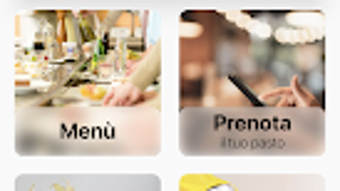
The app features a clean, user-friendly interface structured around clearly labeled sections, enabling fast navigation between menu, booking, and feedback functions. The workflow is designed for simplicity, with each action requiring minimal steps—such as selecting a restaurant, choosing a time slot, and confirming a reservation. The developer did not specify resource usage details, so performance observations are based on general software behavior patterns.
However, given the app’s focus on information display and reservation management, it is expected to operate smoothly on modern Android devices with standard processing and memory capabilities. Stability appears to be prioritized, as the app supports core functions like booking and data retrieval without requiring complex system resources. The user experience is enhanced by consistent visual cues and responsive interactions, which contribute to a reliable and predictable interface.
While exact performance metrics were not provided, the app’s lightweight size of 25.4 MB suggests efficient resource utilization. Overall, the interface and workflow reflect a strong focus on usability, making it accessible even to users unfamiliar with similar applications.
Compatibility & System Requirements
Opera4U is available exclusively for Android devices. The current version is 1.2.0, and the installation size is 25.4 MB. The developer did not provide additional system requirements, so compatibility with specific Android versions or hardware specifications remains unclear.
It is assumed that the app functions on devices running recent Android releases, given its release date in April 2024. However, exact minimum OS versions, RAM, or CPU requirements were not listed. The app is distributed through Google Play, which ensures a secure and verified distribution channel.
Users should ensure their device meets standard Android app requirements to avoid installation issues. While the app’s size is relatively small, indicating low storage demands, no information was provided about background activity, battery consumption, or data usage during operation.
Pros and Cons
Pros
- Free to download and use, with no hidden costs
- Intuitive interface tailored for student users
- Provides detailed nutritional and allergen information for meals
- Enables advance booking to reduce wait times
- Supports user feedback for continuous service improvement
Cons
- Available only on Android, limiting access for iOS users
- No information on system requirements or hardware compatibility
- Performance and resource usage details were not specified
- Limited to services offered by Opera Universitaria di Trento
- Offline functionality was not mentioned
FAQ Section
Is Opera4U available for iOS devices?
Currently, the app is only available for Android. There is no official version for iOS devices.
Is the app free to use?
Yes, Opera4U is completely free to download and use, with no in-app purchases or subscription fees.
Can I use Opera4U without an internet connection?
While the app may cache some data, the developer did not specify offline functionality. It is recommended to use the app with an active internet connection for full access to menus and booking features.
How often are the menus updated?
Menus are updated daily to reflect the current offerings at student restaurants. The app provides real-time access to the latest information.
What kind of support does the app offer for users with food allergies?
The app includes detailed allergen information for each dish, helping users identify safe meal options based on their dietary needs.
Final Thoughts + CTA
Opera4U stands out as a practical, student-focused tool that effectively bridges the gap between university dining services and campus life. Its combination of real-time menu access, nutritional transparency, and reservation capabilities makes it an indispensable resource for students at the University of Trento. The app’s clean interface and logical workflow ensure that users can quickly find what they need without confusion.
While its exclusive availability on Android and lack of detailed system requirements may limit broader accessibility, its core functionality remains strong and purpose-built. For students seeking to optimize their mealtime experience, reduce wait times, and make informed dietary choices, Opera4U delivers tangible value. The inclusion of feedback tools also fosters a sense of community and continuous improvement.
Overall, it is a well-designed, functional solution for a common campus challenge. Download Opera4U now.







